
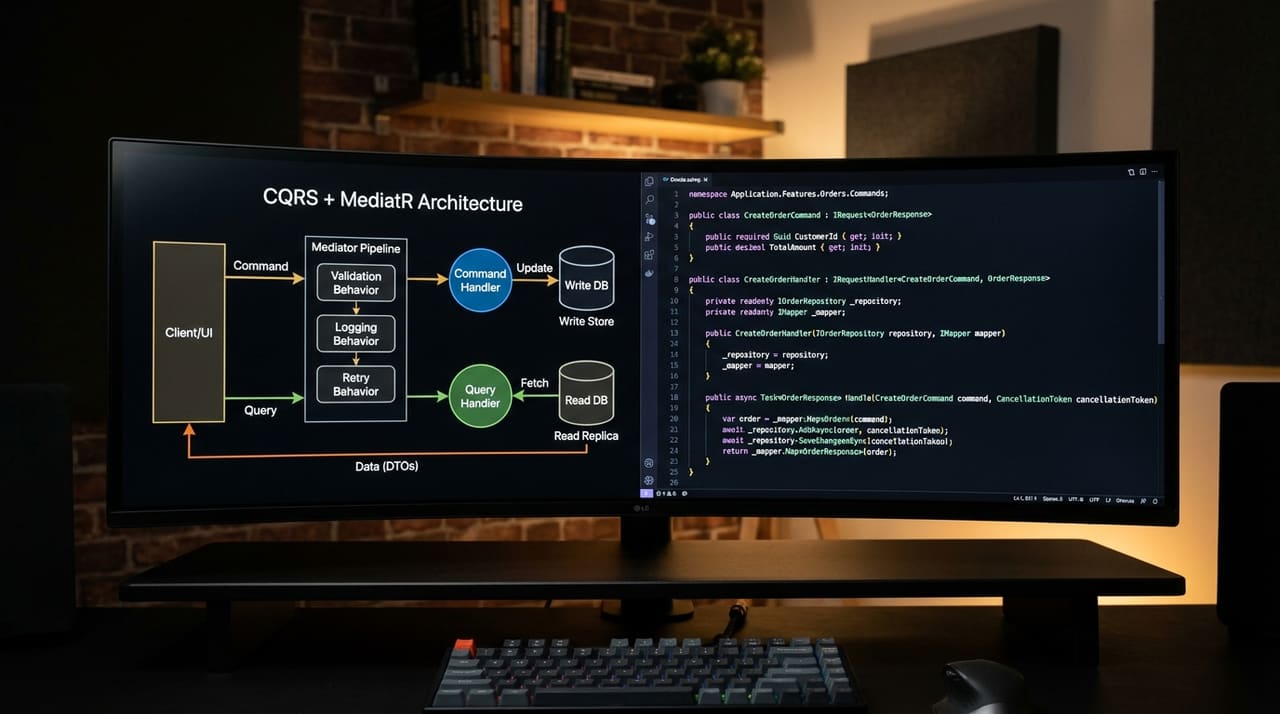
When a software project starts, traditional N-tier services look deceptively simple: you create an OrderService.cs class with two methods, CreateOrder() and GetOrderById(). Six months later, as business requirements expand, that single class accumulates 60 methods—CancelOrder(), RefundOrder(), ApproveB2BOrder(), GetMonthlySalesChart(), ExportOrdersToExcel(), and dozens more.
One morning you open OrderService.cs and find a 3,500-line God Class (Fat Service) whose constructor injects 18 different dependencies (IOrderRepo, IMailService, IPdfGenerator, IRedisCache, IStockService...). Every time a user simply queries an order list, the .NET Dependency Injection container unnecessarily instantiates PDF generators, ERP HTTP clients, and SMTP email services!
In enterprise software engineering—and across every production platform we build at Digital HAT, including the DHWebBackend powering this very website—we eliminate fat services permanently using two complementary architectural patterns: CQRS (Command Query Responsibility Segregation) and the Mediator pattern (via MediatR).
What We Will Architect and Code Step by Step in This Masterclass:
1. What Is CQRS? Why separating state-mutating Commands from read-only Queries transforms performance and maintainability.
2. How MediatR decouples HTTP Controllers from business logic, shrinking controller actions to 3 lines of code.
3. The completeApplication/Features/Vertical-Slice Directory Tree.
4. File-by-file production C# implementation:CreateProductCommand.cs(with FluentValidation) andGetProductsListQuery.cs.
5. MediatR's superpower: implementingIPipelineBehavior<TRequest, TResponse>for automated pre-handler validation (ValidationBehavior) and slow-request telemetry (LoggingAndPerformanceBehavior).
6. Wiring everything cleanly inApplicationServiceRegistration.csandProductsController.cs.
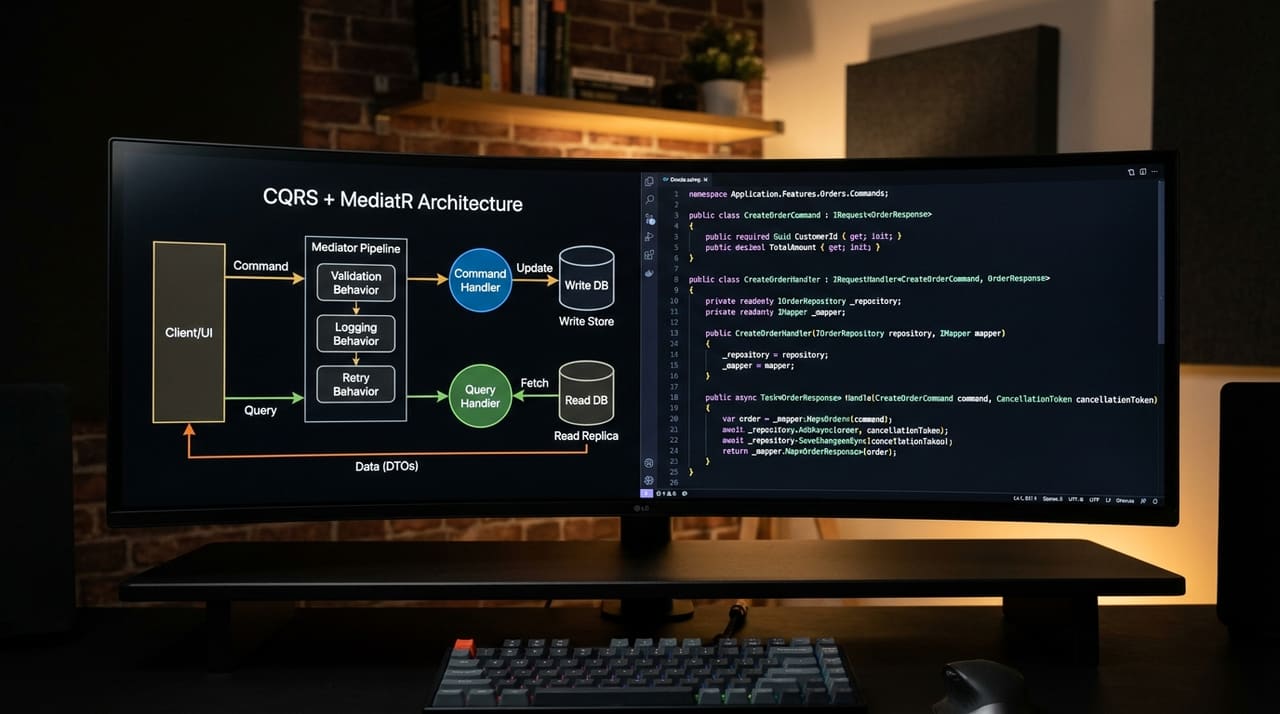
1. The Philosophy of CQRS: Commands and Queries Never Mix!
CQRS (Command Query Responsibility Segregation) elevates Bertrand Meyer's Command-Query Separation principle to the architectural level by dividing every application operation into two strictly isolated pathways:
| Architectural Dimension | 1. COMMAND (Write / State Mutation Path) | 2. QUERY (Read-Only Projection Path) |
|---|---|---|
| Primary Responsibility | Mutates system state: creates, updates, or soft-deletes records and triggers domain side effects. | Never mutates state! Retrieves projected data tailored for UI screens or reports. |
| Naming Convention | Imperative verb phrase: CreateProductCommand, ApprovePermitCommand, CancelOrderCommand |
Question/lookup phrase: GetProductByIdQuery, GetProductsListQuery |
| Return Payload | Returns only the newly created resource ID (Guid) or acknowledgment status. |
Returns lightweight, immutable ReadOnly DTOs tailored to the view. |
| Database Strategy | Loads rich Domain Entities, enforces invariants, and commits via EF Core Change Tracker & Transactions. | Bypasses entity tracking using AsNoTracking() and direct .Select(x => new Dto(...)) SQL projections. |
2. The Enterprise Feature-Folder (Vertical Slice) Directory Tree
When implementing CQRS with MediatR, we never dump 150 files into horizontal folders named Services/ or Interfaces/. Instead, we organize the Application layer into Feature Folders (Vertical Slices) grouped by business capability:
src/DigitalHat.Commerce.Application/
├── DigitalHat.Commerce.Application.csproj       # References MediatR & FluentValidation packages
├── ApplicationServiceRegistration.cs            # Single extension method registering MediatR, Validators & Pipelines
├── Common/
│   └── Behaviors/                               # Cross-cutting MediatR pipeline interceptors
│       ├── ValidationBehavior.cs                # Automatically executes FluentValidation rules before any Handler runs
│       └── LoggingAndPerformanceBehavior.cs     # Automatically logs execution duration & warns on slow (>250ms) requests
└── Features/                                    # BUSINESS CAPABILITIES (Each domain module lives in its own slice!)
    ├── Products/
    │   ├── Commands/                            # PRODUCT WRITE OPERATIONS
    │   │   ├── CreateProduct/
    │   │   │   └── CreateProductCommand.cs      # Command + FluentValidator + Handler co-located in one cohesive file!
    │   │   ├── UpdateProductPrice/
    │   │   │   └── UpdateProductPriceCommand.cs
    │   │   └── DeleteProduct/
    │   │       └── DeleteProductCommand.cs
    │   └── Queries/                             # PRODUCT READ OPERATIONS
    │       ├── GetProductById/
    │       │   └── GetProductByIdQuery.cs
    │       └── GetProductsList/
    │           └── GetProductsListQuery.cs
    └── Orders/
        ├── Commands/
        │   └── CreateOrder/
        └── Queries/
            └── GetOrderDetails/
Why Vertical Slices Enforce the Single Responsibility & Open/Closed Principles:
When a new engineer joins your team and is asked to modify the product creation rule, they do not hunt through a fragile 3,500-line service class. They openFeatures/Products/Commands/CreateProduct/CreateProductCommand.cs, edit a self-contained 60-line class that injects only the exact dependencies required for that single use case, and ship with 100% confidence that no other endpoint was affected!
3. Step-by-Step Implementation: Commands, Validators, Queries, Pipelines, and Controller
Step 3.1: Installing NuGet Packages in the Application Layer
dotnet add src/DigitalHat.Commerce.Application package MediatR
dotnet add src/DigitalHat.Commerce.Application package FluentValidation.DependencyInjectionExtensions
Step 3.2: The Write Path — Features/Products/Commands/CreateProduct/CreateProductCommand.cs
Here is our complete product creation vertical slice containing the Command message (IRequest<Guid>), its declarative FluentValidation rules (AbstractValidator), and its dedicated Handler (IRequestHandler):
// File Path: src/DigitalHat.Commerce.Application/Features/Products/Commands/CreateProduct/CreateProductCommand.cs
using System;
using System.Threading;
using System.Threading.Tasks;
using DigitalHat.Commerce.Application.Abstractions.Repositories;
using DigitalHat.Commerce.Domain.Entities;
using FluentValidation;
using MediatR;

namespace DigitalHat.Commerce.Application.Features.Products.Commands.CreateProduct;

// 1. COMMAND: Immutable data message declaring that it returns the new product's Guid (IRequest<Guid>):
public record CreateProductCommand(
    string Name,
    string Sku,
    decimal UnitPrice,
    int StockQuantity
) : IRequest<Guid>;

// 2. FLUENT VALIDATOR: Automatically executed by ValidationBehavior BEFORE the Handler is ever invoked!
public class CreateProductCommandValidator : AbstractValidator<CreateProductCommand>
{
    public CreateProductCommandValidator()
    {
        RuleFor(x => x.Name)
            .NotEmpty().WithMessage("Product name is required.")
            .MaximumLength(200).WithMessage("Product name cannot exceed 200 characters.");

        RuleFor(x => x.Sku)
            .NotEmpty().WithMessage("Stock Keeping Unit (SKU) is required.")
            .MaximumLength(64);

        RuleFor(x => x.UnitPrice)
            .GreaterThan(0).WithMessage("Unit price must be greater than zero.");

        RuleFor(x => x.StockQuantity)
            .GreaterThanOrEqualTo(0).WithMessage("Stock quantity cannot be negative.");
    }
}

// 3. COMMAND HANDLER: Responsible strictly for the 'Create Product' use case!
public class CreateProductCommandHandler : IRequestHandler<CreateProductCommand, Guid>
{
    private readonly IProductRepository _productRepository;

    // Notice: We inject ONLY the single dependency required by this specific command!
    public CreateProductCommandHandler(IProductRepository productRepository)
    {
        _productRepository = productRepository;
    }

    public async Task<Guid> Handle(CreateProductCommand request, CancellationToken ct)
    {
        // Instantiate our rich Domain Entity (domain invariants are enforced inside the entity constructor)
        var product = new Product(
            name: request.Name,
            sku: request.Sku,
            unitPrice: request.UnitPrice,
            stockQuantity: request.StockQuantity
        );

        await _productRepository.AddAsync(product, ct);
        await _productRepository.SaveChangesAsync(ct);

        return product.Id;
    }
}
Step 3.3: The Read Path — Features/Products/Queries/GetProductsList/GetProductsListQuery.cs
Next, let us write a read-only Query slice that filters active products and projects them into lightweight DTOs without mutating any state:
// File Path: src/DigitalHat.Commerce.Application/Features/Products/Queries/GetProductsList/GetProductsListQuery.cs
using System;
using System.Collections.Generic;
using System.Linq;
using System.Threading;
using System.Threading.Tasks;
using DigitalHat.Commerce.Application.Abstractions.Repositories;
using MediatR;

namespace DigitalHat.Commerce.Application.Features.Products.Queries.GetProductsList;

public record ProductListItemDto(
    Guid Id,
    string Name,
    string Sku,
    decimal UnitPrice,
    int StockQuantity,
    bool IsInStock
);

// 1. QUERY: Accepts an optional search filter and returns a read-only collection of ProductListItemDto
public record GetProductsListQuery(string? SearchTerm = null) : IRequest<IReadOnlyList<ProductListItemDto>>;

// 2. QUERY HANDLER:
public class GetProductsListQueryHandler : IRequestHandler<GetProductsListQuery, IReadOnlyList<ProductListItemDto>>
{
    private readonly IProductRepository _productRepository;

    public GetProductsListQueryHandler(IProductRepository productRepository)
    {
        _productRepository = productRepository;
    }

    public async Task<IReadOnlyList<ProductListItemDto>> Handle(GetProductsListQuery request, CancellationToken ct)
    {
        var products = await _productRepository.GetAllActiveAsync(ct);

        var query = products.AsEnumerable();
        if (!string.IsNullOrWhiteSpace(request.SearchTerm))
        {
            string term = request.SearchTerm.Trim().ToLowerInvariant();
            query = query.Where(p =>
                p.Name.ToLowerInvariant().Contains(term) ||
                p.Sku.ToLowerInvariant().Contains(term));
        }

        return query
            .Select(p => new ProductListItemDto(
                p.Id,
                p.Name,
                p.Sku,
                p.UnitPrice,
                p.StockQuantity,
                IsInStock: p.StockQuantity > 0))
            .ToList();
    }
}
Step 3.4: MediatR Pipeline Behaviors — Automated Validation and Performance Telemetry
The true power of MediatR lies in IPipelineBehavior<TRequest, TResponse>. Instead of duplicating validation boilerplate and Stopwatch timers across 100 handlers, we write two centralized pipeline behaviors. Every Command and Query dispatched through _mediator.Send(...) automatically flows through these interceptors before reaching its handler:
// 1. File Path: src/DigitalHat.Commerce.Application/Common/Behaviors/ValidationBehavior.cs
using System.Collections.Generic;
using System.Linq;
using System.Threading;
using System.Threading.Tasks;
using FluentValidation;
using MediatR;

namespace DigitalHat.Commerce.Application.Common.Behaviors;

public class ValidationBehavior<TRequest, TResponse> : IPipelineBehavior<TRequest, TResponse>
    where TRequest : notnull
{
    private readonly IEnumerable<IValidator<TRequest>> _validators;

    public ValidationBehavior(IEnumerable<IValidator<TRequest>> validators)
    {
        _validators = validators;
    }

    public async Task<TResponse> Handle(
        TRequest request,
        RequestHandlerDelegate<TResponse> next,
        CancellationToken ct)
    {
        if (_validators.Any())
        {
            var context = new ValidationContext<TRequest>(request);
            var validationResults = await Task.WhenAll(
                _validators.Select(v => v.ValidateAsync(context, ct)));

            var failures = validationResults
                .SelectMany(r => r.Errors)
                .Where(f => f is not null)
                .ToList();

            if (failures.Count != 0)
            {
                // Short-circuit the pipeline and throw before the Handler ever executes!
                throw new ValidationException(failures);
            }
        }

        return await next();
    }
}
// 2. File Path: src/DigitalHat.Commerce.Application/Common/Behaviors/LoggingAndPerformanceBehavior.cs
using System.Diagnostics;
using System.Threading;
using System.Threading.Tasks;
using MediatR;
using Microsoft.Extensions.Logging;
namespace DigitalHat.Commerce.Application.Common.Behaviors;
public class LoggingAndPerformanceBehavior<TRequest, TResponse> : IPipelineBehavior<TRequest, TResponse>
where TRequest : notnull
{
private readonly ILogger<LoggingAndPerformanceBehavior<TRequest, TResponse>> _logger;
public LoggingAndPerformanceBehavior(ILogger<LoggingAndPerformanceBehavior<TRequest, TResponse>> logger)
{
_logger = logger;
}
public async Task<TResponse> Handle(
TRequest request,
RequestHandlerDelegate<TResponse> next,
CancellationToken ct)
{
string requestName = typeof(TRequest).Name;
var stopwatch = Stopwatch.StartNew();
// Execute the next pipeline step / target Handler:
TResponse response = await next();
stopwatch.Stop();
if (stopwatch.ElapsedMilliseconds > 250)
{
_logger.LogWarning("[PERFORMANCE ALERT] {RequestName} took {ElapsedMs} ms to complete!",
requestName, stopwatch.ElapsedMilliseconds);
}
else
{
_logger.LogInformation("[CQRS] {RequestName} completed in {ElapsedMs} ms.",
requestName, stopwatch.ElapsedMilliseconds);
}
return response;
}
}Step 3.5: DI Assembly Registration and the Ultra-Clean 3-Line Controller
// 1. File Path: src/DigitalHat.Commerce.Application/ApplicationServiceRegistration.cs
using System.Reflection;
using DigitalHat.Commerce.Application.Common.Behaviors;
using FluentValidation;
using MediatR;
using Microsoft.Extensions.DependencyInjection;

namespace DigitalHat.Commerce.Application;

public static class ApplicationServiceRegistration
{
    public static IServiceCollection AddApplicationServices(this IServiceCollection services)
    {
        var assembly = Assembly.GetExecutingAssembly();

        // 1. Automatically scan and register all FluentValidation validators in this assembly:
        services.AddValidatorsFromAssembly(assembly);

        // 2. Register all MediatR Command/Query Handlers and Pipeline Behaviors:
        services.AddMediatR(cfg =>
        {
            cfg.RegisterServicesFromAssembly(assembly);
            cfg.AddBehavior(typeof(IPipelineBehavior<,>), typeof(ValidationBehavior<,>));
            cfg.AddBehavior(typeof(IPipelineBehavior<,>), typeof(LoggingAndPerformanceBehavior<,>));
        });

        return services;
    }
}

// 2. File Path: src/DigitalHat.Commerce.WebApi/Controllers/ProductsController.cs
using System;
using System.Threading;
using System.Threading.Tasks;
using DigitalHat.Commerce.Application.Features.Products.Commands.CreateProduct;
using DigitalHat.Commerce.Application.Features.Products.Queries.GetProductsList;
using MediatR;
using Microsoft.AspNetCore.Mvc;

namespace DigitalHat.Commerce.WebApi.Controllers;

[ApiController]
[Route("api/[controller]")]
public class ProductsController : ControllerBase
{
    private readonly ISender _mediator;

    // The controller knows zero repositories or DbContexts—only MediatR's ISender abstraction!
    public ProductsController(ISender mediator) => _mediator = mediator;

    [HttpGet]
    public async Task<IActionResult> GetAll([FromQuery] string? search, CancellationToken ct)
        => Ok(await _mediator.Send(new GetProductsListQuery(search), ct));

    [HttpPost]
    public async Task<IActionResult> Create([FromBody] CreateProductCommand command, CancellationToken ct)
    {
        Guid id = await _mediator.Send(command, ct);
        return Created($"/api/products/{id}", new { id });
    }
}
4. Next Lesson: Enterprise B2B SaaS Architecture — Multi-Tenancy Isolation & RBAC
Look how concise, testable, and decoupled ProductsController has become! In fact, the DHWebBackend powering dgtalhat.com is built on this exact Features/ vertical-slice CQRS and MediatR architecture. In Part 2 of this series, we will explore Industrial-Scale B2B SaaS Architecture: Multi-Tenancy Data Isolation and Role-Based Access Control (RBAC)!
Did you find this engineering guide helpful?
Give it a like or share it with your team and network.